


Accessibility metadata DELETE SLUG
The addition of extra metadata is recommended to help with discovery and accessibility.
Accessibility Metadata is an important requirement for accessible EPUBs which describes the accessibility features of the EPUB.
Ebook distributors, platforms and retailers rely on this industry standard information to help readers, librarians and educators make informed choices on which ebooks they can offer to readers.
With the free Metadata Matcher tool in GreenLight this accessibility metadata can be easily viewed, edited, applied, extracted and copied between documents.
To add a CircularFLO Metadata Panel go to the CircularFLO Accessibility Tools menu > Accessibility Tools > Add Metadata panel
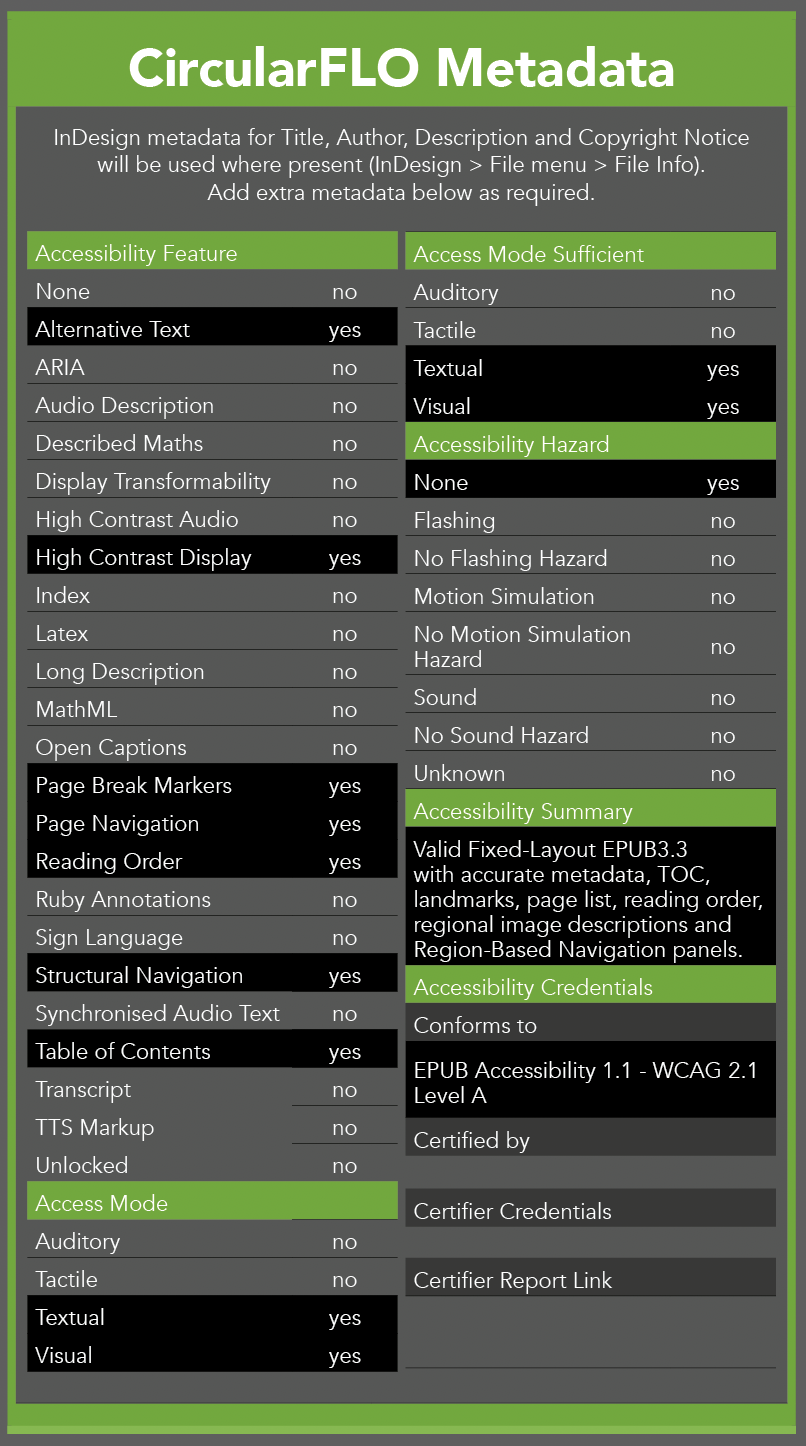
Definition of Accessibility Features
Content features of the resource, such as accessible media, supported enhancements for accessibility and alternatives.
The None value is only to be used to indicate that all other values in this section are set to no. As all InDesign documents have page markers added this can left set to no. A double negative meaning it is not none!
The Alternative Text value is used to indicate that all images and other non-text content (e.g., audio and video) that is relevant to understanding a publication includes a text alternative.
The ARIA value is used to indicate that the ARIA roles are used. This is true when exporting with CircularFLO.
The Audio Description value is used to indicate that description tracks are included for any video sources that require them.
The Display Transformability property is used to indicate that a publication does not restrict the ability of users to modify the display of textual content (e.g., to change the font family, font size, line height and word spacing).
The High Contrast Display value is used to indicate that there is at least a 7:1 contrast ratio between the foreground text and the background, including for images of text.
The Index value is used to indicate that a publication contains one or more indexes of the content (e.g. a topical index or index of names).
The Latex value is used to indicate that a publication contains math equations formatted using the LaTeX typesetting system.
The Long Description value is used to indicate that all complex content (images, tables, charts, equations, etc.) include an extended description of their purpose.
The MathML value is used to indicate that the MathML markup language has been used to encode the mathematical equations.
The Open Captions value indicates that a publication includes open captions for auditory content. Open captions are burned directly into the video and are always visible in an unchangeable form.
Both Page Break Markers the Page Navigation and values are used to indicate that static print page break locations are included in the ebook text. This is true for CircularFLO exported Fixed-lyout EPUBs.
The Reading Order value is used to indicate that there is a logical reading order to the text of a publication.
The Ruby Annotations value is used to indicate that a publication comes with explanatory annotations that improve the accessibility of the work.
The Structural Navigation value is used to indicate that all headings are properly marked up.
The Synchronized Audio Text value is used to indicate that synchronized playback of prerecorded audio with text highlighting is available.
The Table Of Contents value is used to indicate that a publication includes a table of contents for navigating the major sections of the work.
The
The Unlocked value is used to indicate that no digital rights management (DRM) or other content restriction protocols are applied to the content.
Definition of Access Modes
An access mode through which the intellectual content of a described resource or adaptation is communicated.
The auditory value is used to indicate that there is an auditory component to the content (e.g., audio tracks on their own or as part of a video, or an audiobook).
The tactile value is used to indicate that a publication contains tactile content, such as braille-formatted text or tactile images.. This is commonly left set to no here.
The textual value is a common one as it is used to indicate that a publication contains text content.
The visual value is used to indicate that a publication contains visual content such as images, grapics and video.
Definition of Access Mode Sufficient
A list of single or combined access modes that are sufficient to understand all the intellectual content of a resource.
The property takes one or more of the following values:
- auditory
- tactile
- textual
- visual
The meaning of these values is the same as their definitions for access modes, but sufficient access modes identify the different combinations of senses that can be used to sufficiently consume the content, not just the raw access modes of the content itself.
A publication with images and text, for example, will require both visual and textual modes to be consumed. If the images are also adequately described (alt text and extended descriptions, as appropriate) a single textual mode would also be sufficient, indicating someone who is blind can consume the content.
Definition of Accessibility Hazards
A characteristic of the described resource that is physiologically dangerous to some users.
The flashing values is used to indicate that there is content in the publication that flashes more than three times a second.
The motionSimulation value is used to indicate that there is content that simulates motion.
The sound value is used to indicate that a publication contains any auditory content.
The none value is used when the publisher is sure that the content presents no known hazards for users.
The unknown value is used to indicate that a publisher has not yet checked their publication for hazards or is unsure whether some content might present a hazard.
These descriptions have been generously supplied by DAISY. For Pro users a full description of all these accessibility categories can be found on the DAISY article on Schema.org Accessibility Metadata.


